


Plattsmouth Community Schools employs a 1:1 program for our 7th-12th grade students. The 1:1 program involves ensuring each student their own device. This allows the student to work in their own environment, much more similar to what they may work with in a job or during college.
This program is designed to empower our students with access to their own dedicated device. By cultivating crucial 21st-century skills, students can be better prepared for success in a technology-driven world.
We utilize a combination of remote management and on-premises assistance to ensure that these devices are working to their fullest extent. Middle school students currently are not allowed to take home their devices. All students are filtered using our content filter, regardless of where their device goes.
Let us know if you have any questions!
Help Desk
The primary way to submit a ticket is to email helpdesk@pcsd.org with a description of your issue. Responses and any follow-up will come directly to your email, so you will not need to visit a specific website to track tickets.
You may also submit a ticket at helpdesk.pcsd.org by selecting "Submit a Request." If you use this method, all subsequent communications will still be handled via email.
Each building's tech facilitators have access to the system and can respond to tickets. To ensure messages are routed and tracked efficiently, please email helpdesk@pcsd.org instead of messaging a tech staff member or facilitator directly.
Requests to unblock websites on Content Keeper should also be emailed to the helpdesk so any tech staff member can address them quickly.
Thank you for your cooperation and patience.
Frequently Asked Questions
Can I bring my own device to use instead?
No. Our network is built for the devices we have put on it - in fact, using our network on your personal device is breaking district policy. This restriction is put in place to ensure the safety of our network, and others using it, and ensure students are staying on-task when in class.
I am a parent and I am concerned about how my student is using their device.
The technology department exercises a zero tolerance policy towards misuse of educational technology by students. If there is concern relative to what your student is doing on their school issued device, you may contact the technology department for any questions and we will be able to assist as much as possible. The technology department monitors all traffic from school issued devices, and on top of maintaining our content filters, notify the main office of misuse of the devices.
Further questions or concerns can be directed to the leader of the 1:1 device program listed on this page.
I forgot my iPad for today. What do I do?
You will get a loaner iPad from either the technology office or the library, depending on which one is available. All loaners are due to be returned immediately at the end of the day. This is important to ensure all students have access to a device regardless of if they left it at home.
Failure to turn in a loaner will be handled in the same way as a lost device without insurance - your Infinite Campus account will have a fee applied to it, and it will be removed once the device is recovered.
I have lost my charger, can I get a new one?
Yes. Please visit the technology office in the high school and speak to the department to get a new one. Because all chargers are numbered, you must turn in the charger you originally got with distribution. Turning in the wrong charger at the end of the year will cause you to be billed for the missing charger.
When we give you a new charger after losing your current charger, we will place a fee on your account. There is no need to pay this immediately. If you do happen to find your old charger, this gives us the ability to remove the fee entirely.
The technology department has a zero tolerance policy for loss of chargers or damage to property. If theft occurs, you must speak to the high school administration and it will need to be resolved by them.
I need an app on my iPad. Can you add it?
First, you should check to see if the application is already available to you. Plattsmouth Community Schools has a library of applications that are available to students on their 1:1 devices. To see if an application is available, follow the steps below:
- Open Mosyle Manager/Mosyle School
- Open "My Apps" on the left hand side
- Click "Reinstall/Update" underneath the application you'd like to install
If the application you are looking for is not available, please send an email to your teacher so they may review the app and send it upwards to the technology department. All applications must be reviewed by the technology department and curriculum director before they will be added to student devices.
I think I've lost my iPad. Can you find it?
Yes. Please let the technology department know as soon as you think you've lost your device. All of our iPads are managed, and as such, we can retrieve their location at any time. We will place the iPad into "Lost Mode" which prevents access to the device until it is seen by the technology department. We are also able to make it "ping" itself, so it will make a sound until it is found.
Signing in to/with Google
Whenever you are asked to sign into Google, you will follow a few steps to login correctly. Immediately when attempting to sign in with Google, you will see a screen similar to the one below.
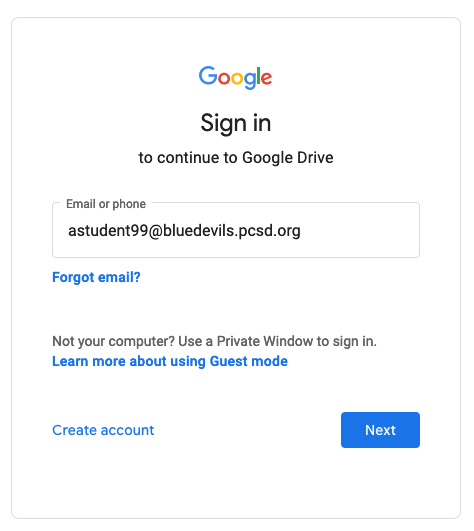
You should have an email address assigned to you. If you do not know your email address, please be sure to speak with a faculty member. After clicking Next, you will be brought to ClassLink. Here, you will use your username rather than your email address, and then the password you were assigned.
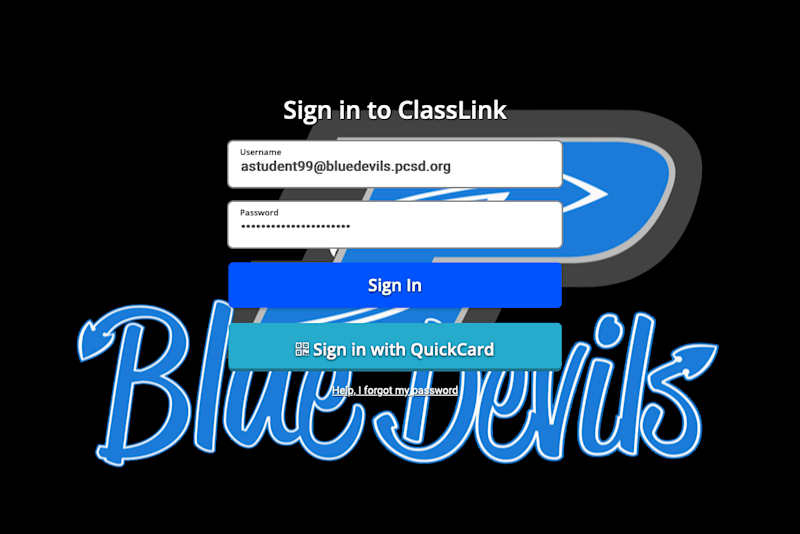
After these steps are complete, click Sign In, and you should have access to Google.
What are the fees associated with the iPads?
Currently, Plattsmouth Community Schools requires all students to pay a $35 fee for insurance on any device a student receives. This insurance policy will pay up to 85% of $1000, after $100.00 in damage has occurred to the device, and if the amount is paid BEFORE damage occurs. This insurance policy does not cover accessories, such as chargers and carrying cases. Keyboard cases are covered by the policy, if the damage costs are valued over $100.00.
Please see the table below for the breakdown of costs:
| Item | Cost |
Apple USB C Charger Base | $ 35.00 |
USB C to Lightning Cable | $ 5.00 |
Logitech Rugged Combo 3 | $ 99.95 |
Apple iPad + Apple Care | $ 450.00 |
Carrying Case + Charger Bag | $ 28.00 |
Carrying Case Strap | $ 6.00 |
What filters are employed to comply with CIPA?
Plattsmouth Community Schools deploys ContentKeeper to all student devices. This software prevents access to harmful content online by automatically blocking sites based on what is on the page. ContentKeeper adapts and grows as the internet does. See the flyer below for more information.
Parents have the ability to request that their students be even further restricted on their device - Plattsmouth Community Schools utilizes ContentKeeper and maintains a whitelist of websites. This list is updated manually, so each site is carefully reviewed before being added to that list. Please contact the technology department for more information regarding this topic.
What is the difference between my username and my email?
Some of our sites and logins will ask that you use a username rather than your email address, and vice versa. In some cases, it will ask for both when signing in. The major difference is the addition of "@bluedevils.pcsd.org" at the end of the text.
All students should receive a slip of paper when they pick up their device that looks similar to the one below:
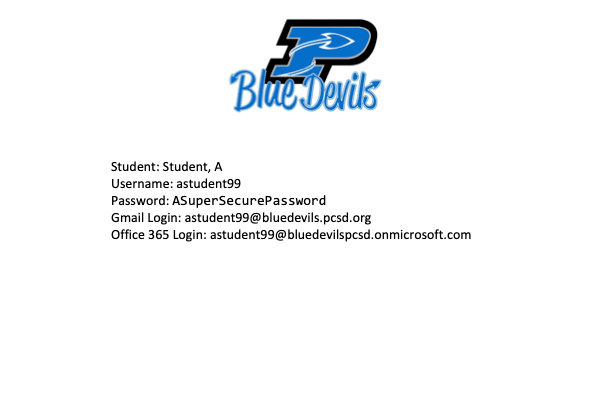
While your username and email address are similar, they are not interchangeable. Make sure you are using the correct one to access the resource.